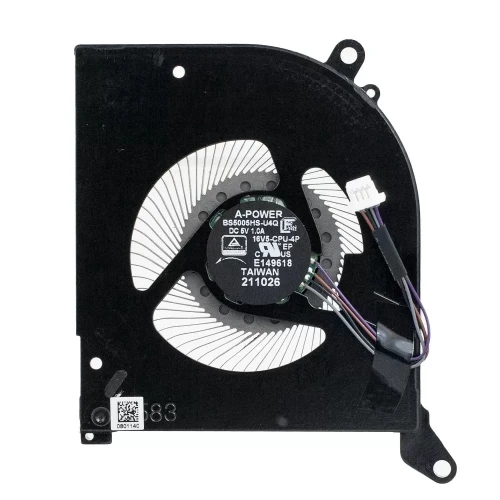
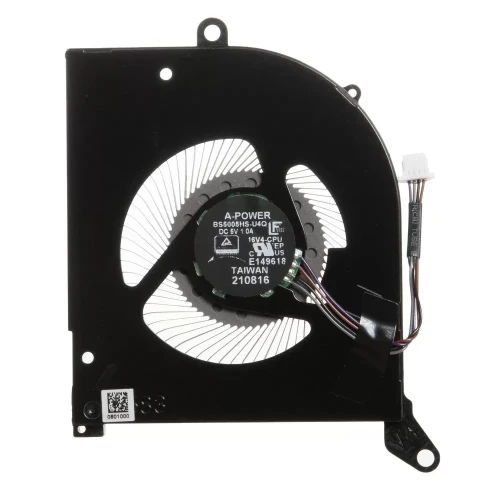
Complete specifications for reference:
Asus N750JV
MSI GS70 2PC-074UK
Asus G75VW
Dell HC9GK
MSI GT780 Series
MSI GT70 2PC
MSI GT60
MSI GT783
Acer Aspire 7530G
Acer Aspire 7535
Acer Aspire 7540
Acer Aspire 7715Z
Acer Aspire 7735
Acer Aspire 7735G
Acer Aspire 7735ZG
Acer Aspire 7736
Acer Aspire 7736G
Acer Aspire 7736Z
Acer Aspire 7736Z-4088
Acer Aspire 7738
Acer Aspire 7738G
Acer Aspire 7740
Acer Aspire 7745
Acer Aspire 7745G
Acer Aspire V3-771G Series
Asus K7 series:
Asus K70AB / Asus K70AE / Asus K70IO / Asus K72JR
Asus N70 / Asus N70SV / Asus N750 Series:
Asus N750J / Asus N750JK
Asus N750JK-DB71 / Asus N750JK-T4013H / Asus N750JK-T4042H / Asus N750JK-T4043H / Asus N750JK-T4067H / Asus N750JK-T4082H / Asus N750JK-T4115H / Asus N750JK-T4188H / Asus N750JK-T4201H / Asus N750JK-T4262H / Asus N750JV / Asus N750JV-T4020H / Asus N750JV-T4090H / Asus N750JV-T4110H
Asus X52N
Asus X7010
Asus X73SL
Asus X73Y
Asus X77VG
Asus X77JA
sus X77JV
Asus G72GX
Asus G73 series:
Asus G73JH / Asus G73JH-A1 / Asus G73SW
Asus X751LX
Asus X751LX-BB71-CB
Clevo x7200
Clevo W370
Clevo W370ET
Dell XPS 17 L701X
Dell XPS 17 L702X
Dell Inspiron 1750
Dell Inspiron 1764
Dell Studio 1745
Dell Studio 1747
Dell Vostro 3700
eMachine G525
eMachine G625
eMachine G627
eMachine G730
Gateway NV7802U
HP Envy 17-J Series
HP Envy 17-Jxxx Series
HP Envy 17-J100 Series
HP Envy 17-J100NS
HP Envy 17-J1xx Series
HP ProBook 470 G2
HP ProBook 470-G2
Medion Erazer MD97895
Medion Erazer MD97927
Medion Erazer MD98541
Medion Erazer MD98543
Medion Erazer X7611
Medion Erazer X7813
Medion Erazer X7815
Medion Erazer X7819
Medion Erazer X7821
Medion Erazer X7833
Medion Erazer X7835
MSI CX700 Series
MSI CR70 Series MSI CR70 0M Series (CR70-0M)
MSI CR70 2M Series (CR70-2M)
MSI CX72 6QD Series (CX72-6QD)
MSI CX72 6QD-080XES (CX72-6QD-080XES)
MSI CX72 6QD-081XES (CX72-6QD-081XES)
MSI CX72 6QD-231XES (CX72-6QD-231XES)
MSI CX72 6QD-234XES (CX72-6QD-234XES)
MSI CX72 6QL Series (CX72-6QL)
MSI CX72 7QL Series (CX72-7QL)
MSI CX72 7QL-023XES (CX72-7QL-023XES)
MSI CX72 7QL-026(CX72-7QL-026)
MSI GE70 0NC Series (GE70-0NC)
MSI GE70 0ND Series (GE70-0ND)
MSI GE70 2OC Series(GE70-2OC)
MSI GE70 2OE Series (GE70-2OE)
MSI GE70 2PC APACHE Series (GE70-2PC APACHE)
MSI GE70 2PE APACHE PRO Series (GE70-2PE APACHE PRO)
MSI GE70 2PL APACHE Series (GE70-2PL APACHE)
MSI GE70 2PL Series (GE70-2PL)
MSI GE70 APACHE PRO-681 Series (GE70 APACHE PRO681)
MSI GS70 2OD Series
MSI GS70-2OD Series:
MSI GS70 2OD Stealth / / MSI GS70 2OD-066ES / MSI GS70 2OD-233ES / MSI GS70 2PC Series:
MSI GS70-2PC Series / MSI GS70 2PC Stealth / MSI GS70 2PC-634ES
MSI GS70 2PE Series:
MSI GS70 2PE Stealth Pro / MSI GS70 2PE-013ES / MSI GS70 2PE-021ES / MSI GS70 2PE-452ES / MSI GS70 2PE-453ES
MSI GT780 Series
MSI MS-1756
MSI MS-1757
MSI MS-1759
Mountain Graphite 40 17.3"
Mountain Graphite 40 Pro 17.3"
Mountain Grafite 40 17.3"
Mountain Grafite 40 Pro 17.3"
Packard Bell EasyNote LJ65
Packard Bell EasyNote LJ71
Packard Bell EasyNote LJ75
Packard Bell EasyNote LJ76
Samsung NP-R719 / NPR719
Samsung NP-R720 / NPR720
Samsung NP-R730 / NPR730
Samsung NP-R780 / NPR780
Samsung NP-SE20 / NPSE20
Sony Vaio PCG-71511L
Sony Vaio PCG-71511M
Sony Vaio PCG-91111L
Sony Vaio PCG-91111M
Sony Vaio PCG-91112M
Sony Vaio PCG-9111L
Sony Vaio PCG-91211M
Sony Vaio PCG-9121M
Sony Vaio VPC-EC series:
Sony Vaio VPC-EC1Z1E/BJ / Sony Vaio VPC-EC1S1E/BJ / Sony Vaio VPC-EC1S1R/BJ
Sony Vaio VPCEC1Z1E/BJ
Sony Vaio VPCEC1S1E/BJ
Sony Vaio VPCEC1S1R/BJ
Sony Vaio VPC-EC2M1R/WI
Sony Vaio SVE171 series:
Sony Vaio SVE171B11M
Toshiba Satellite P70-A Series:
Toshiba Satellite P70-A-104 / Toshiba Satellite P70-A-107 / Toshiba Satellite P70-A-120 / Toshiba Satellite P70-A-125 / Toshiba Satellite P70-A-10D / Toshiba Satellite P70-A-10E / Toshiba Satellite P70-A-10W / Toshiba Satellite P70-A-10Z / Toshiba Satellite P70-A-11N / Toshiba Satellite P70-A-11P / Toshiba Satellite P70-A-11Q / Toshiba Satellite P70-A-11R / Toshiba Satellite P70-A-11V /
Toshiba Satellite P870 Series
Toshiba Satellite P870D Series
Toshiba Satellite P875 Series
Toshiba Satellite P875D Series
N173HGE-L11 LCD screen panel – a high‑quality LCD panel designed for laptops, delivering crisp visuals and accurate color reproduction.
Key specifications:
Compatibility: Guaranteed fit for . Double‑check the connector width and pitch before installation.
Installation tip: Handle the screen by the edges, avoid touching the glass, and route the cable carefully through the hinge to prevent pinching.
Warranty & Support: All products come with a 7‑day return policy and free technical support. If you have any compatibility questions, contact our team at info@pcspare.com.
SKU: LT-7660 | Last updated: 2026-10-21 07:25:45
If you are upgrading to a higher resolution, we recommend checking your laptop's service manual or online forums for confirmed compatibility.
How to verify: Check the connector on your original screen – look for printed labels (e.g., "30P 0.4mm") or measure with a ruler. Compare with our product photos.
If you are unsure, send us a clear photo of your original screen's connector – we can match it for you.
We ship all screens in the grade stated on the product page. All screens are tested for functionality – no lines, no flickering, and backlight is working.
If you require a specific grade, please check the product description or contact us before ordering.
Our warranty covers manufacturing defects only – physical damage during installation is not covered.
Accessing the screen requires removing the bezel – some models also require removing the entire display assembly (lid) from the base to avoid damaging cables.
Critical: The cable must be inserted all the way – if it is not fully seated, you will get a partial display or no image. Do not force the cable; if it does not go in easily, check the orientation.
Always disconnect the battery before connecting or disconnecting the LCD cable to avoid short circuits.
Note: This is a delicate operation – proceed with caution. If you are not confident, consider using a professional repair service.
Common pitfalls to avoid:
Watch our installation video or consult your laptop's service manual for model‑specific details.
Critical precautions:
Troubleshooting – what if the screen does not work after installation?
If you have tried all the above and the problem persists: Contact our support with photos of the screen issue and your laptop model – we will help diagnose and arrange a replacement if necessary.