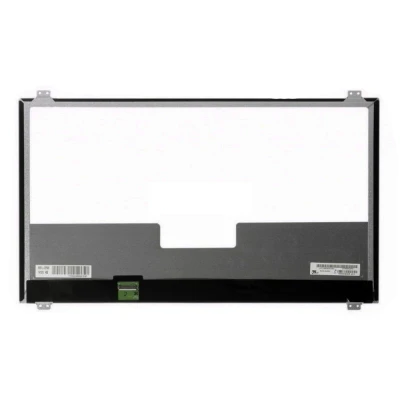
Complete specifications for reference:
Asus G751J Series
Asus G751JL Series
Asus G751JM Series
Asus G751JT Series
Asus G751JY Series
Asus N751J Series
Asus N751JK Series
Asus N751JX Series
Asus X751LX Series
Asus X751LX-DB71 / Asus X751LX-DH71
Medion Erazer X7841 Series
Medion Erazer X7841 (MD60009 MSN:30020633A1) / Medion Erazer X7841 (MD60084 MSN:30020974) / Medion Erazer X7841 (MD99373 MSN:30020027) / Medion Erazer X7841 (MD99556 MSN:30019811) / Medion Erazer X7841 (MD99729 MSN:30019998) / Medion Erazer X7841 (MD99735 MSN:30020023) / Medion Erazer X7841 (MD99735 MSN:30020024) / Medion Erazer X7841 (MD99737 MSN:30020026) / Medion Erazer X7841 (MD99881 MSN:130020314) / Medion Erazer X7841 (MD99881 MSN:30020314) / Medion Erazer X7841 (MD99881 MSN:30020315) / Medion Erazer X7841 (MD99881 MSN:30020316) / Medion Erazer X7841 (MD99882 MSN:30020265) / Medion Erazer X7841 (MD99882 MSN:30020266) / Medion Erazer X7841 (MD99969 MSN:30020586) / Medion Erazer X7841 (MD99969 MSN:30020587) / Medion Erazer X7841 (MD99978 MSN:30020599) / Medion Erazer X7841 (MD99979 MSN:30020600)
Medion Erazer X7843 Series
Medion Erazer X7843 (MD60086 MSN: 130020975) / Medion Erazer X7843 (MD99557 MSN:30019704) / Medion Erazer X7843 (MD99558 MSN:30019709) / Medion Erazer X7843 (MD99558 MSN:30019917) / Medion Erazer X7843 (MD9957) / Medion Erazer X7843 (MD99668 MSN:30019875) / Medion Erazer X7843 (MD99692 MSN:30019917) / Medion Erazer X7843 (MD99727 MSN:30019996) / Medion Erazer X7843 (MD99728 MSN:30019997) / Medion Erazer X7843 (MD99883 MSN:130020267) / Medion Erazer X7843 (MD99883 MSN:30020267) / Medion Erazer X7843 (MD99884 MSN:30020322) / Medion Erazer X7843 (MD99884 MSN:30020323) / Medion Erazer X7843 (MD99886 MSN:130020324) / Medion Erazer X7843 (MD99886 MSN:30020324) / Medion Erazer X7843 (MD99919 MSN:130020476)
Medion Erazer X7847 Series
Medion Erazer X7847 (MD60290 MSN: 130021459) / Medion Erazer X7847 (MD60342) / Medion Erazer X7847 (MD60425 MSN: 130022239) / Medion Erazer MD60342 / Medion Erazer MD60425 / Medion Erazer MD9957 / Medion Erazer MD99997 / Asus G571J / Asus G731G / Asus G701
LP173WF4-SPD1 LCD screen panel – a high‑quality LCD panel designed for laptops, delivering crisp visuals and accurate color reproduction.
Key specifications:
Compatibility: Guaranteed fit for . Double‑check the connector width and pitch before installation.
Installation tip: Handle the screen by the edges, avoid touching the glass, and route the cable carefully through the hinge to prevent pinching.
Warranty & Support: All products come with a 7‑day return policy and free technical support. If you have any compatibility questions, contact our team at info@pcspare.com.
SKU: LT-8241 | Last updated: 2026-10-21 07:25:47
If you are upgrading to a higher resolution, we recommend checking your laptop's service manual or online forums for confirmed compatibility.
How to verify: Check the connector on your original screen – look for printed labels (e.g., "30P 0.4mm") or measure with a ruler. Compare with our product photos.
If you are unsure, send us a clear photo of your original screen's connector – we can match it for you.
We ship all screens in the grade stated on the product page. All screens are tested for functionality – no lines, no flickering, and backlight is working.
If you require a specific grade, please check the product description or contact us before ordering.
Our warranty covers manufacturing defects only – physical damage during installation is not covered.
Accessing the screen requires removing the bezel – some models also require removing the entire display assembly (lid) from the base to avoid damaging cables.
Critical: The cable must be inserted all the way – if it is not fully seated, you will get a partial display or no image. Do not force the cable; if it does not go in easily, check the orientation.
Always disconnect the battery before connecting or disconnecting the LCD cable to avoid short circuits.
Note: This is a delicate operation – proceed with caution. If you are not confident, consider using a professional repair service.
Common pitfalls to avoid:
Watch our installation video or consult your laptop's service manual for model‑specific details.
Critical precautions:
Troubleshooting – what if the screen does not work after installation?
If you have tried all the above and the problem persists: Contact our support with photos of the screen issue and your laptop model – we will help diagnose and arrange a replacement if necessary.