Watch official ASUS videos for installation, disassembly, and repair guidance.
Open ASUS Installation Guide File / Videos
Complete specifications for reference:
ADP‑200JB D
ASUS TUF Dash F15 Series
FX516PM
FX516PR
FX516QR
FX516P
FX516PC
FX516PE; FX517ZR
FX517ZM
FX517ZC
FX517ZE (2022 models); TUF516PR
TUF516PM
TUF516PE
TUF516PC
ASUS TUF Gaming A15 / F15 / F17 / A17 (2022 & earlier)
FA507RC
FA507RE; FX507ZE
FX507ZC
FX507ZC4; FX707ZC
FX707ZE
FX707ZM; FA707RC
FA707RE;
FA506QR
FA506QM
FA506IH
FA506II
FA506IHR
FA506NF
FA506NFR
FA506IU
FA506IC
FA506IE
FA506QE
FA506NC
FA506NCR;
FX506HM
FX506HC
FX506HE
FX506LU
FX506HEB
FX506HCB
FX506IV
FX506IU
FX506II
FX506IH
FX506H
FX506L
FX506HF
FX506LH
FX506LI;
FX706HF
FX706LI
FX706LH
FX706
FX706HC
FX706HCB
FX706HE
FX706HEB
FX706IU
FX706HM (TUF706HE);
FA706IE
FA706IC
FA706QE
FA706I
FA706IU
FA706IH
FA706IHR
FA706II
FA706NF
FA706NFR
ASUS TUF Gaming FX505 / FX566 / FX705 / FX766 / FX86 / FX95 Series
FX505GM
FX505GE
FX505GD
FX505GT
FX505DY
FX505DU
FX505DT
FX505DD
FX505D
FX505G;
FA566IH
FA566IV
FA566II
FA566IU
FA566QE; FX566II
FX566IH
FX566IU
FX566IV
FX566LI
FX566LH;
FX705GD
FX705GM
FX705GE
FX705GT
FX705G
FX705DD
FX705DY
FX705DU
FX705DT
FX705D;
FX766
FX766LI
FX766IU
FX766HC
FX766HCB
FX766LI‑HX185T;
FX86F
FX86S
FX86SM
FX86FE
FX86FM
FX86SE
FX86SY
FX86SD;
TUF705GD
TUF705GE
TUF705GM;
FX95GT
FX95G
FX95DU
FX95GU
FX95D
ASUS ROG Strix G15 / G17 / Hero III / G531 / G731 / GL504 / GL531 / GL731
G513RC
G513IC
G513IE
G513IR
G513QC
G513QE
G513QH;
G713RC
G713IC
G713IE
G713QC
G713QE
G713IH;
G731GW
G731GW‑XB74
G731GW‑DH76
G731GV
G731GV‑DB74
G731GV‑DB76;
G531GD
G531GT; G731GT
G731G; GL504GM; G512LI; G513IH; GL531GT
GL531G; GL731GT
ASUS ROG Studio 17
PX713IC
PX713IH
PX713IM
PX713IR
PX713QC
PX713QE
PX713QM
PX713QR
PX713Q
ASUS ROG Zephyrus G14 / G15 / S / Zenbook Pro / Duo
GA503RM
GA503R
GA503QM
GA503QR
GA503QS (G15 2022); GA503QE
GA503QC;
GA401QEC‑K2064T
GA401
GA401QC
GA401QE
GA401QM
GA401QH
GA401IHR
GA401IH
GA401II
GA401IU
GA401IV
GA401IVC;
GA502IU
GA502IV
GA502DU; GX531GM;
UX7602VI
UX7602ZM (Zenbook Pro 16X OLED); UX6404VV
UX6404VI (Zenbook Pro 14 OLED);
UX8402VU
UX8402VV
UX8402ZA
UX8402ZE (Zenbook Pro 14 Duo OLED)
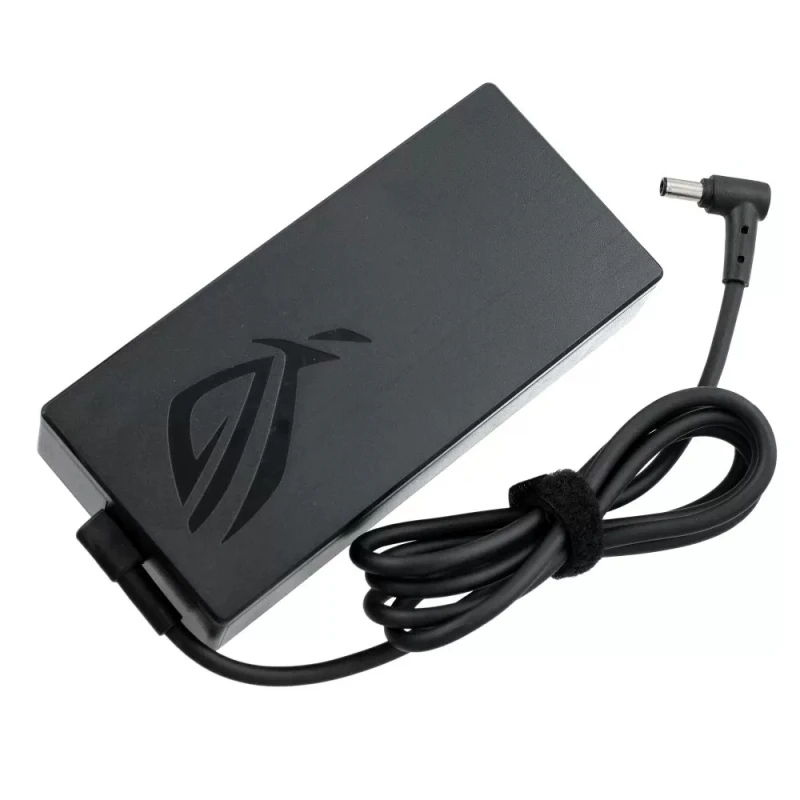
Asus 20V 10A - 200W AC power adapter 6.0x3.7mm – a high‑performance AC power adapter for laptops, ensuring stable and efficient charging.
Key specifications:
Compatibility: Guaranteed to work with . Always match the voltage – using a different voltage can damage your laptop.
Usage tip: Place the adapter on a hard, ventilated surface. Avoid bending the DC cord sharply.
Warranty & Support: All products come with a 7‑day return policy and free technical support. If you have any compatibility questions, contact our team at info@pcspare.com.
SKU: LT-10030009 | Last updated: 2026-10-21 07:27:12
Wattage: N/A | Voltage/Current: 20V 10A | Connector: 6.0x3.7mm
These specifications must match your laptop's original adapter to ensure safe and stable power delivery. Using an adapter with incorrect voltage or current can damage your device or cause it to malfunction.
This adapter is designed for laptops that require N/A and use a 6.0x3.7mm connector. It is compatible with models listed in our product description. Please check the part number (Asus 200W 20V 10A 6.0x3.7mm) against your original adapter – if they match or are listed as compatible, it will work.
Important: Even if the connector fits, the voltage must match exactly (e.g., 19V vs 20V). Using a different voltage can permanently damage the motherboard.
This adapter uses a 6.0x3.7mm connector. Common types include:
Always verify the polarity of your original adapter before connecting. If the polarity is reversed, the laptop will not power on, and the protection circuit may be triggered (or in worst case, damage the system board).
If none of the above works, the adapter may be incompatible or defective – contact our support for assistance.
Always use the original adapter or a certified replacement. An undersized adapter (lower wattage) may cause the laptop to throttle performance or fail to charge while under load. Over‑sized adapters (higher wattage) are generally safe, as the laptop draws only the current it needs – but voltage must still match exactly.