Watch official Acer videos for installation, disassembly, and repair guidance.
Open Acer Installation Guide File / Videos
Complete specifications for reference:
Acer Aspire A315-21
A315-21-21ZW
A315-21-603C
A315-21-64P4
A315-21-968G
A315-21G
A315-21G-904
A315-21G-904P
A315-21G-92G
A315-21G-92GM
A315-31
A315-31-C825
A315-31-C8SB
A315-31-P8VL
A315-32
A315-33
A315-33-C1CD
A315-33-C54B
A315-41
A315-41G
A315-41G-R3Eg
A315-41-R3DQ
A315-41-R5DX
A315-41-R7VB
A315-51
A315-51-306R
A315-51-30TW
A315-51-310J
A315-53
A315-53-85DQ
A515-41
A515-41G
A515-51
A515-51-52QL
A515-51G
A515-51G-50FN
A515-51G-50MR
A515-51G-55Ex
A515-51G-572A
A515-51G-77S
A515-51G-83Mk
A515-51G-85DA
A517-51
A517-51-33EK
A517-51G
A517-51P
A517-51P-56D4
A517-51P-80AG
A615-51
A615-51G
A615-51G-59EA
A715-71
A715-71G
A715-71G-75HJ
A715-71G-779Z
A715-71G-78AS
A715-72
A715-72G
A717-71
A717-71G
A717-72
A717-72G
E5-522
E5-522G
E5-523
E5-523-67WF
E5-523G
E5-523G-905K
E5-523G-953K
E5-523G-9794
E5-532
E5-532G
E5-532T
E5-535
E5-535G
E5-535T
E5-552
E5-552G
E5-553
E5-553G
E5-553G-15FM
E5-553G-1615
E5-553G-18U5
E5-553G-T5PB
E5-553-T17H
E5-573
E5-573-32X8
E5-573-37CT
E5-573-395N
E5-573-57KU
E5-573-C2HY
E5-573G
E5-573G-324X
E5-573G-32KQ
E5-573G-34W6
E5-573G-35N0
E5-573G-38A4
E5-573G-501U
E5-573G-51J8
E5-573G-5369
E5-573G-55LY
E5-573G-561H
E5-573G-5679
E5-573G-589G
E5-573G-779Z
E5-573G-785Z
E5-573-P8VX
E5-573T
E5-573TG
E5-574
E5-574G
E5-574G-71K2
E5-574G-78SH
E5-574T
E5-574TG
E5-575
E5-575-542P
E5-575-70D0
E5-575G
E5-575G-30R6
E5-575G-511A
E5-575G-53DY
E5-575G-55GR
E5-575G-58HD
E5-575G-59HQ
E5-575G-72LP
E5-575G-77FW
E5-575G-77TM
E5-575G-78H4
E5-575G-79TH
E5-575T
E5-575TG
E5-576
E5-722
E5-722-60E9
E5-722G
E5-723
E5-723G
E5-752
E5-752G
E5-772
E5-772G
E5-772G-5123
E5-773
E5-773G
E5-773G-50QD
E5-773G-58ZU
E5-773G-79ZV
E5-774
E5-774G
E5-774G-53LR
E5-774G-53VF
E5-774G-552L
E5-774G-57NJ
E5-774G-70J7
E5-774G-70LW
E5-774G-73BX
E5-774G-76FA
E5-774G-79A
E5-775
E5-775G
ES1-523
ES1-523-2342
ES1-523-24VX
ES1-523-2515
ES1-523-26S0
ES1-523-431B
ES1-523-66YN
ES1-523-67YW
ES1-523-887J
ES1-523-888U
ES1-524
ES1-532
ES1-532G
ES1-533
ES1-533-C94P
ES1-533-C9H9
ES1-533-C9SP
ES1-533-P4WC
ES1-572
ES1-572-33D5
ES1-572-33PB
ES1-572-36XH
ES1-732
ES1-732-P5QN
ES1-732-P7VY
F5-521
F5-522
F5-571
F5-571G
F5-571T
F5-572
F5-572G
F5-572G-765M
F5-572G-798K
F5-572G-79YK
F5-573
F5-573G
F5-573G-528T
F5-573G-7093
F5-573G-7126
F5-573G-73J5
F5-573G-76Z1
F5-573G-7828
F5-573G-79XL
F5-573T
F5-771
F5-771G
F5-771G-5517
F5-771G-59N0
F5-771G-74P9
F5-771G-78FC
K50-10
K50-20
K50-30
K55-20
V3-574
V3-574G
V3-574T
V3-574TG
V3-574TGZ
V3-575
V3-575G
V3-575G-58LU
V3-575T
V3-575TG
V5-591
V5-591G
V5-591G-70GU
V5-591G-711Z
V5-591G-75YC
V5-591G-76PT
Acer Aspire V Nitro VN7-572
VN7-572G
VN7-572G-5065
VN7-572G-50NJ
VN7-572G-52AV
VN7-572G-54YG
VN7-572G-72L0
VN7-572G-75N7
VN7-572G-7880
VN7-572TG
VN7-592G
VN7-592G-70JW
VN7-592G-74F6
VN7-792G
VN7-792G-593V
VN7-792G-599V
VN7-792G-59CL
VN7-792G-785Q
Acer Extensa 15 EX2511
EX2511-31b7
EX2511-32AS
EX2511-32Z9
EX2511-33ET
EX2511-387J
EX2511G
EX2511GTI
EX2520
EX2520-50GL
EX2520-79D6
EX2520G
EX2540
EX2540 NX.EFHEB.001
EX2540 NX.EFHEB.008
EX2540 NX.EFHEB.009
EX2540 NX.EFHEB.012
EX2540 NX.EFHEB.036
EX2540 NX.EFHEB.050
EX2540 NX.EFHEB.059
EX2540 NX.EFHEB.060
EX2540-32SY
EX2540-32YK
EX2540-336B
EX2540-33C6
EX2540-33DL
EX2540-33QK
EX2540-35BD
EX2540-38DV
EX2540-38QU
EX2540-39D1
EX2540-39UN
EX2540-50EN
EX2540-50SV
EX2540-54A9
EX2540-56XL
Acer TravelMate P2510
p2510-G2-M
P2510-G2-M-31MH
P2510-G2-M-53ST
P2510-G2-M-58WM
p2510-G2-M-8250U
P2510-G2-M-85QX
P2510-G2-MG-50WE
P2510-G2-MG-51E5
P2510-G2-MG-80AT
P2510-G2-MG-8530
P2510-M
P2510-M-33LC
P2510-M-36F6
P2510-M-394D
P2510-M-52AHP257
P257-M
P257-M-535Y
P257-M-77S8
P257-MG
P258-M
P258-M-532G
P258-M-53RG
P258-MG
P258-MG-572F
P259
P259-G2-M
P259-G2-M NX.VEPEB.059
P259-G2-M NX.VEPEB.060
P259-G2-M-351E
P259-G2-M-54HZ
P259-G2-M-58F4
P259-G2-MG
P259-M
P259-M-335C
P259-M-395Q
P259-M-513M
P259-M-515A
P259-M-55D4
P259-MG
P259-MG-50k7
P259-MG-76H3
P277-M
P277-MG
P278-M
P278-M-31UV
P278-M-5038
P278-M-5319
P278-M-5355
P278-M-54L6
P278-MG
P278-MG-53E9
P278-MG-76L2
P278-MG-794K
P459-G2-M
P459-G2-M-57CG
P459-M
P459-M-59C3
P459-MG
TX50-G1
TX50-G2
TX520-G2-MG
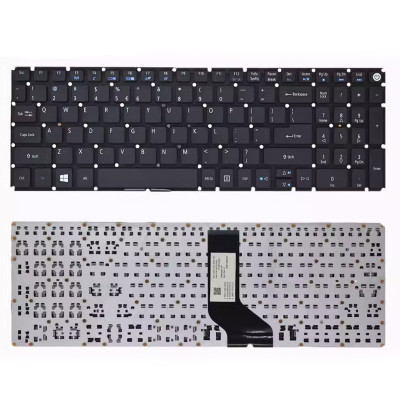
Keyboard for Acer E5-522 E5-523 E5-532 E5-552 E5-573 E5-574 black backlit – a high-quality replacement keyboard designed specifically for laptops.
Key specifications:
Compatibility: This keyboard is guaranteed to fit and its variants. Please verify your laptop’s exact model number (printed on the bottom label) before ordering.
Installation tip: Always disconnect the battery first. Note the orientation of the ribbon cable before removal – reversing it can damage the connector.
Warranty & Support: All products come with a 7‑day return policy and free technical support. If you have any compatibility questions, contact our team at info@pcspare.com.
SKU: PCS-14978 | Last updated: 2026-09-16
Important: Layouts are not interchangeable – the key positions, Enter key shape, and modifier key sizes vary. Installing a US keyboard on a UK laptop will result in some keys not matching the keycaps, and the operating system may map the keys incorrectly (though you can change the keyboard layout in software).
How to verify: Check your original keyboard – look for the Enter key shape (wide horizontal vs tall vertical) and the position of the backslash key. If unsure, send us a photo of your original keyboard and we will confirm the layout.
Connection: If your keyboard has a separate backlight cable, connect it to the designated motherboard header. If the backlight is integrated into the main ribbon cable, no additional connection is needed.
If you are replacing a non‑backlit keyboard with a backlit one, make sure your laptop's motherboard has the necessary connector – otherwise the backlight will not work.
If the cable has a reinforcing strip (a thicker plastic piece at the end), ensure this strip is positioned correctly – it usually indicates the insertion depth and orientation.
If you are unsure about the correct orientation, our installation video and photos can guide you – or contact our support for assistance.
Yes – please verify the following physical attributes to ensure a perfect fit:
Part number (PN) check: The PN on the back of the keyboard may differ from your original, but we guarantee full compatibility if the model and layout match. If you are unsure, send us a photo of the back of your original keyboard (showing the PN sticker) and we will confirm.
Important note on model variants: Some laptop models have different keyboard variants depending on the region and configuration (e.g., some have backlit, some do not; some have a fingerprint reader, some do not). Always check your original keyboard's features before ordering.
If you are unsure, contact our support with your laptop's exact model number and a photo of your original keyboard – we will confirm compatibility for you.
The keyboard connects to the motherboard via a ribbon cable that passes through a slot in the C Cover, plugging into a ZIF connector on the motherboard (usually labelled KEYBOARD, KBD, or J_KB).
Access: To replace the keyboard, you may need to remove the bottom cover (D Cover) or the bezel around the keyboard – depending on the model. Some laptops require removing the entire palmrest (C Cover).
Always consult your laptop's service manual for the specific removal method – forcing the keyboard can damage the clips or the C Cover.
Connection procedure:
If the keyboard has a separate backlight cable:
Do not force the cable – if it does not go in easily, check the orientation. Bent pins on the motherboard header can be difficult to repair.
Note: Keyboard replacement methods vary by laptop model. The steps below are general – refer to your laptop's service manual for model‑specific instructions.
For top‑mount keyboards (most common):
For bottom‑mount keyboards:
Common mistakes to avoid:
If you are unsure about any step, watch our installation video or consult your laptop's service manual.
Critical precautions:
Troubleshooting after installation:
If the problem persists: Contact our support with details about which keys are not working and photos of your keyboard installation – we will help diagnose if the keyboard is defective or incompatible.
For most laptops, no driver installation is needed – keyboards are standard HID (Human Interface Device) and are automatically recognized by Windows, macOS, and Linux.
However, there are a few exceptions:
Step‑by‑step for Windows users:
If you are using Linux or macOS, the keyboard should work plug‑and‑play – you may only need to adjust the layout settings in the system preferences.