Watch official Acer videos for installation, disassembly, and repair guidance.
Open Acer Installation Guide File / Videos
Complete specifications for reference:
Acer ConceptD 5 CN516-72G
CN516-73G
5 Pro CN516-72P
7 Pro CN715-72P
CN715-72G
CC715-71P
7 Ezel CC715-71
CC715-72G
7 Ezel Pro CC715-71P
CC715-72P
CC715-91P
CC715-92P
7 Spatial Edition CN715-73G
Acer Nitro 18 AI AN18-61
Nitro 17 AN17-42
AN17-41
AN17-51
AN17-71
Nitro 16 AN16-52
AN16-51
AN16-43
AN16-42
AN16-41
Nitro 14 AN14-41
Nitro V 17 AI ANV17-61
Nitro V 16 ANV16-71
ANV16-42
ANV16-41
Nitro V 14 ANV14-62
ANV14-61
Nitro V 15 ANV15-51
ANV15-41
Aspire V 17 Nitro VN7-793G
VN7-792G
VN7-791G
Aspire V 15 Nitro VN7-572
VN7-571
VN7-593G
VN7-592G
VN7-591G Gaming Laptop
Acer Nitro 5 AN517-55
AN517-42
AN515-58
AN515-46
AN517-54
AN517-53
AN517-52
AN517-51
AN517-41
AN517-43
AN515-57
AN515-45
AN515-54
AN515-56
AN515-55
AN515-53
AN515-52
AN515-51
AN515-44
AN515-43
AN515-42
AN515-41
AN515-31
Nitro 7 AN715-52
AN715-51 Gaming Laptop
Acer Predator Helios Neo 14 AI PHN14-71
PHN14-51
Predator Helios Neo 16S PHN16S-71
Predator Helios 300 PH317-55
PH317-54
PH317-53
PH317-52
PH317-51
Predator Helios 300 PH315-54
PH315-53
PH315-52
PH315-51
Predator Triton 16 PT16-51
Predator Triton 14 AI PT14-52T
PT14-51
Predator Triton 300 PT315-53
PT315-52
PT315-51
Predator Triton 300 SE PT316-51s
PT314-52s
PT314-51s
Predator Triton 500 PT515-51
PT515-52
Predator Triton 500 SE PT516-51s
PT516-52S Laptop
Acer N20C3
N20C9
N20C11
N22C1
N22C2
N22C3
N22C4
N19Q6
N17Q11
N15P4
N18I2
N18I3
N18W3
N1812
N16W3
N16W4
N15P3
N15Q12
N18C3
N18C4
N20C1
N20C2
N17C1
N17C2
N16C7
N15W7
P/N: ADP-135K
ADP-135KB
ADP-135KB T
ADP-180MB K
ADP-180TB F
PA-1131-05
PA-1131-16
PA-1231-16A
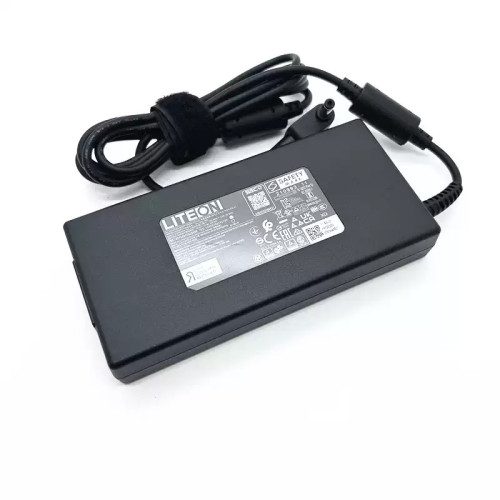
Acer 230W AC power adapter 19.5V 11.8A 5.5x1.7mm – a high‑performance AC power adapter for laptops, ensuring stable and efficient charging.
Key specifications:
Compatibility: Guaranteed to work with . Always match the voltage – using a different voltage can damage your laptop.
Usage tip: Place the adapter on a hard, ventilated surface. Avoid bending the DC cord sharply.
Warranty & Support: All products come with a 7‑day return policy and free technical support. If you have any compatibility questions, contact our team at info@pcspare.com.
SKU: LT-10030302 | Last updated: 2026-09-23 10:41:03
Wattage: 230W | Voltage/Current: 19.5V 11.8A | Connector: 5.5x1.7mm
These specifications must match your laptop's original adapter to ensure safe and stable power delivery. Using an adapter with incorrect voltage or current can damage your device or cause it to malfunction.
This adapter is designed for laptops that require 230W and use a 5.5x1.7mm connector. It is compatible with models listed in our product description. Please check the part number (Acer 230W 19.5V 11.8A 5.5x1.7mm) against your original adapter – if they match or are listed as compatible, it will work.
Important: Even if the connector fits, the voltage must match exactly (e.g., 19V vs 20V). Using a different voltage can permanently damage the motherboard.
This adapter uses a 5.5x1.7mm connector. Common types include:
Always verify the polarity of your original adapter before connecting. If the polarity is reversed, the laptop will not power on, and the protection circuit may be triggered (or in worst case, damage the system board).
If none of the above works, the adapter may be incompatible or defective – contact our support for assistance.
Always use the original adapter or a certified replacement. An undersized adapter (lower wattage) may cause the laptop to throttle performance or fail to charge while under load. Over‑sized adapters (higher wattage) are generally safe, as the laptop draws only the current it needs – but voltage must still match exactly.