Watch official Lenovo videos for installation, disassembly, and repair guidance.
Open Lenovo Installation Guide File / Videos
Complete specifications for reference:
Compatible with Lenovo ADL170NCC3A ADL170NLC2A ADL170NDC2A ADL170NLC3A ADL170SLC2A ADL170SDC2A ADL170SCC2A ADL170SDC3A ADL170SLC3A ADL170NDC3A ADL170SCC3A ADP-170CB BC ASP-170CB B ADL170SLC3 ADL170SLC3 SA10R16886 SA10R16884 4X20E50574 4X20E50586 4X20E50588 4X20E50581 4X20E50577 4X20E50587 4X20E50589 4X20E50575 4X20E50576 4X20E50584 4X20E50579 4X20E50578 4X20E50580 4X20E50583 4X20E75090 4X20S56701 02DL140 45N0370 45N0372 45N0373 45N0374 45N0375 45N0487 45N0514 45N0371 45N0558 888015042 36200321 PA-1171-71 01FR043 02DL141 02DL137 02DL138 02DL136 02DL139
170W 135W 90W Charger
Compatible with Lenovo Legion Y530-15ICH Type 81FV Y530-15ICH-1060 Type 81LB Y540-15IRH-PG0 (Type 81SY); Y540-17IRH-PG0 (Type 81T3); Y545-PG0 (Type 81T2); Y720-15IKB; Y730-15ICH (Type 81HD) Y730-17ICH (Type 81HG) R720-15IKBN Type 80WW R720-15IKB Type 80WX; Legion 5 15IRX10 5-15ARH05 Type 82B5 5-15IMH05 Type 82AU 5-17IMH05 82B3 5P-15IMH05 82AY; Legion Slim 5 14APH8 Type 82Y5 Slim 5 16AHP9 Type 83DH Slim 5 16APH8 Type 82Y9 Slim 5 16ARP9 Type 83EX Slim 5 16IRH8 Type 82YA; Legion S7-15IMH5 Type 82BC S7-15ARH5 Type 82HM S7-15ACH6 Type 82K8 S7-16IAH7 Type 82TF S7-16ARHA7 Type 82UG; Y520-15IKBA Y520-15IKBM Y520-15IKBN Type 80WK 80YY 80WY Y40-70 Laptop 90W Y40-80 Laptop 90W Y50-70 (80DT 80EJ) Y50-70 Touch Y50-80 (80FC 80FD) Y70-70 Touch Y70-80 Touch (80DU 80FE) Pro 5 16IMH9 (Type 83D4 Pro 5 16AHP9 (Type 83D5 Pro 5 16APH8 (Type 83AR Pro 5 16IRH8
Compatible with Lenovo LOQ 15 16 inch 15APH8 15APH8D 15APH8A 15APH8AD 15IAX9 15IAX9I 15IRH8 15IRH8D 15IRX9 15AHP9 16IRH8 16IRH8D 16APH8 16APH8D 15ARP9 15IAX9E 15IRX10
Compatible with Lenovo ThinkBook 15p IMH - Type 20V3 15P G2 ITH - Type 21B1
Compatible with Lenovo ThinkPad P15v Gen 1 (type 20TQ
20TR) P15v Gen 2 (type 21A9
21AA) P15v Gen 3 (Type 21D8 21D9 21EN 21EM) T15p Gen 1 (type 20TN 20TM) T15p Gen 2 (Type 21A7
21A8) T15p Gen 3 (Type 21DA 21DB) P16v Gen 1 (Type 21FC
21FD 21FE
21FF) P16v Gen 2 (Type 21KX
21KY) X1 Extreme 1st Gen (Type 20MF
20MG) X1 Extreme 2nd Gen (Type 20QV
20QW) X1 Extreme 3rd Gen (Type 20TK
20TL) X1 Extreme 4th Gen (Type 20Y5
20Y6) X1 Extreme Gen 5 (Type 21DE
21DF) P1 Gen 1 (Type 20MD
20ME) Laptop P1 Gen 2 (Type 20QT
20QU) Laptop P1 Gen 3 (type 20TH
20TJ ) Laptop P1 Gen 4 (type 20Y3
20Y4 ) Laptop P1 Gen 5 (Type 21DC 21DD) Laptop P1 Gen 6 (Type 21FV
21FW) Laptop P1 Gen 7 (Type 21KV
21KW) Laptop W540 Mobile Workstation Laptop W541 Mobile Workstation Laptop W550s Mobile Workstation Laptop; ThinkPad P50 P51 (Type 20HH
20HJ 20MM
20MN) P52 (Type 20M9
20MA) P53 (Type 20QN
20QQ) P70 P71 (type 20HK
20HL) P72 (type 20MB
20MC) P73 (type 20QR
20QS) P16 Gen 1 (Type 21D6
21D7) P16 Gen 2 (Type 21FA
21FB) P15 Gen 1 (type 20ST
20SU) P15 Gen 2 (type 20YQ
20YR) T15g Gen 1 (type 20UR 20US) T15g Gen 2 (Type 20YS
20YT) P17 Gen 1 (type 20SN
20SQ) P17 Gen 2 (type 20YU
20YV)
Compatible with Lenovo Yoga Slim 7 Pro 16IAH7 Type 82VA Slim 7 Pro 16ACH6 Type 82QQ Slim 7 Pro 16ARH7 Type 82UW Slim 7-15IMH05 Type 82AB Creator 7-15IMH05 Type 82DS 720-15IKB (Type 81C7 81AG) C940-15IRH Type 81TE 9-15IMH5 S740-15IRH Type 81NX Home 900-27IBU All-in-One; Yoga Pro 9 16IMH9 (Type 83DN Pro 9 16IRP8
AIO 7-27ARH6 All-in-One
AIO 7 27ARH7 All-in-One
AIO 7 27APH8 All-in-One
AIO 7-27ACH6 All-in-One
AIO 9 32IRH8 All-in-One Desktop; Slim 7 16IAH7 Type 82VB Slim 7 16ARH7 Type 82UX X1 Extreme Gen 5 (Type 21DE
21DF)
Compatible with Lenovo ideapad 700-15ISK Laptop (15") Type 80RU 700-17ISK Laptop (17") Type 80RV Y700-14ISK Laptop Type 80NU Y700-15ISK Laptop Y700-15ACZ Laptop Type 80NV Y700-17ISK Laptop Type 80Q0 S740-15IRH Type 81NY S740-15IRH Touch Type 81NW; Gaming 3 16ARH7 Type 82SC Gaming 3 16IAH7 Type 82SA Gaming 3 15ARH7 Type 82SB 82UK Gaming 3 15IAH7 Type 82S9 82UJ Gaming 3 15ACH6 Type 82K2 82MJ Gaming 3 15IHU6 Type 82K1 82MG Gaming 3 15IMH05 Type 81Y4 82CG Gaming 3 15ARH05 Type 82EY Creator 5-15IMH05 Type 82D4 Creator 5-16ACH6 Type 82L6 5 Pro-16ACH6 Type 82L5 5 Pro 16IAH7 Type 82SK 5 Pro 16ARH7 Type 82SN L340-15IRH Gaming Laptop L340-17IRH Gaming Laptop
Compatible with Lenovo B40-30 (Touch) All-in-One B50-30 (Touch) All-in-One B50-35 All-in-One A740 All-in-One A540 All-in-One
Compatible with Lenovo ThinkStation P320 Tiny ThinkStation P330 Tiny P350 Tiny Workstation P3 Tiny Workstation (30DE
30DF
30DR
30DS) P3 Ultra Workstation P360 Tiny Workstation P360 Ultra Workstation
Compatible with Lenovo ThinkCentre M900 Tiny Type 10FL M900x Tiny Desktop Type 10LX M910 Tiny Type 10MU M910q Desktop Type 10MU M910x Tiny Desktop Type 10N0 M920 Tiny Desktop Type 10RR M920x Tiny DesktopType 10S0 M90a Desktop M90a Gen 2 Desktop
Compatible with Lenovo ThinkSmart Edition Tiny M920q for Zoom Rooms Type 10T1 Edition Tiny M920q for Logitech Type 10T1 Edition Tiny M920q for Poly Type 10T1 P340 Tiny Workstation
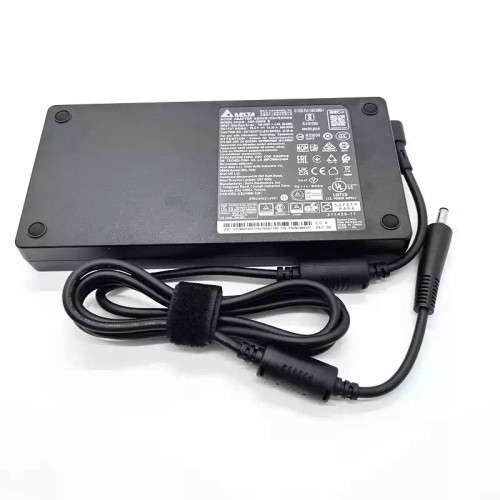
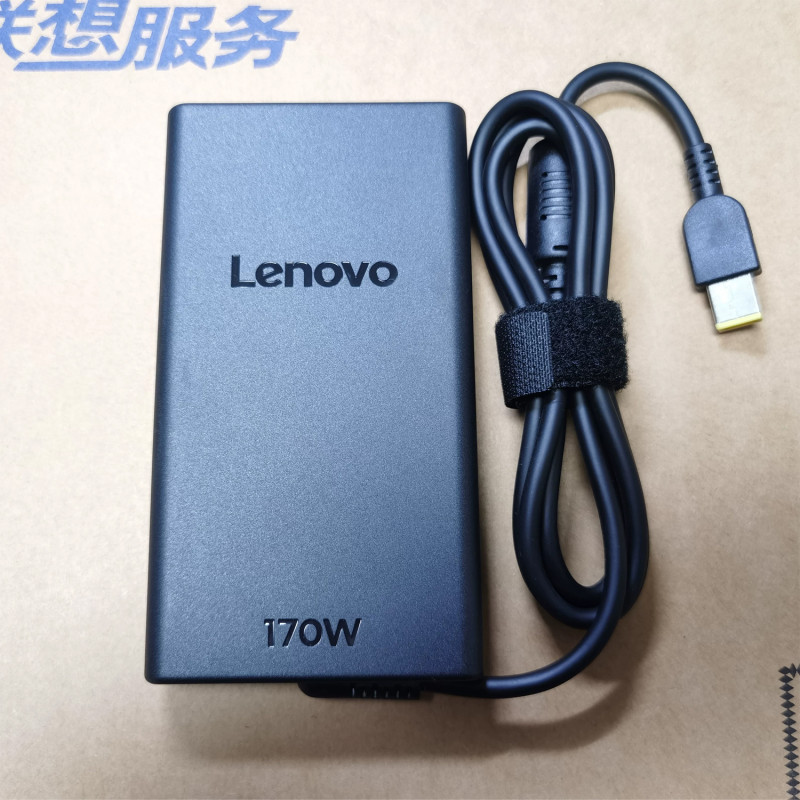
Lenovo Legion Y530-15ICH Type 81FV AC power adapter 170W Yellow Square – a high‑performance AC power adapter for laptops, ensuring stable and efficient charging.
Key specifications:
Compatibility: Guaranteed to work with . Always match the voltage – using a different voltage can damage your laptop.
Usage tip: Place the adapter on a hard, ventilated surface. Avoid bending the DC cord sharply.
Warranty & Support: All products come with a 7‑day return policy and free technical support. If you have any compatibility questions, contact our team at info@pcspare.com.
SKU: LT-10028558 | Last updated: 2026-09-18 10:11:39
Wattage: 170W | Voltage/Current: 20V 8.5A | Connector: Yellow Square Slim Tip
These specifications must match your laptop's original adapter to ensure safe and stable power delivery. Using an adapter with incorrect voltage or current can damage your device or cause it to malfunction.
This adapter is designed for laptops that require 170W and use a Yellow Square Slim Tip connector. It is compatible with models listed in our product description. Please check the part number (Legion Y530-15ICH Type 81FV) against your original adapter – if they match or are listed as compatible, it will work.
Important: Even if the connector fits, the voltage must match exactly (e.g., 19V vs 20V). Using a different voltage can permanently damage the motherboard.
This adapter uses a Yellow Square Slim Tip connector. Common types include:
Always verify the polarity of your original adapter before connecting. If the polarity is reversed, the laptop will not power on, and the protection circuit may be triggered (or in worst case, damage the system board).
If none of the above works, the adapter may be incompatible or defective – contact our support for assistance.
Always use the original adapter or a certified replacement. An undersized adapter (lower wattage) may cause the laptop to throttle performance or fail to charge while under load. Over‑sized adapters (higher wattage) are generally safe, as the laptop draws only the current it needs – but voltage must still match exactly.