Watch official Lenovo videos for installation, disassembly, and repair guidance.
Open Lenovo Installation Guide File / Videos
Complete specifications for reference:
ADL245SDC3A
ADL245SLC3A
SA11Q29115
5A11Q29116
SA11Q29123
SA11Q29120
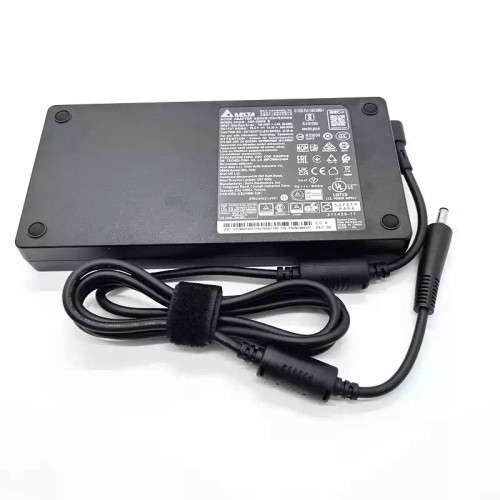
245W Yellow Square Laptop Charger Power adapter Compatible with Lenovo
Compatible with Lenovo Legion 7 16IAX10 83KY 7 16AGP11 Machine Type 83Q8 7 16ARHA7 82UH 7 16IRX9 Laptop (83DG 83FG) 7-15IMH05 81YT 7-15IMHg05 81YU
Compatible with Lenovo Legion Pro 5 16IAX10 83F3 Pro 5 16IRX10 83NN Pro 5 16ADR10 83LT Pro 5 16ARX8 Type 82WM Pro 5 16IRX8 Type 82WK 5 Pro 16IAH7 Type 82S0 5 Pro 16ARH7 Type 82RY 5 Pro 16ARH7H Type 82RG 5 Pro-16ACH6 Type 82JS 5 Pro-16ACH6H Type 82JQ 5 Pro-16ITH6 Type 82JF 5 Pro-16ITH6H Type 82JD 5 Pro 16IAH7H Type 82RF Pro 5 16AFR10 Machine Type 83F2 5 16IAX10 83NX 5 15IAX10 83F0 83N2 5 15AHP10 83M0 5 15IRX10 83LY 5 15AKP10 83F1 5 15AGP11 5a 83Q6 5 15AHP11/ 5a 83Q7 5 15IAX11 Machine Types 83QE 83VK 5 15IPH11 83RW 5 15IRX10 5 15IRX9 Type 83JJ 5 15APH9 Type 83EG 5 15ARP8 Type 83EF 5 16IRX9 Type 83DG 5-15ARH05 Type 82B5 5-15IMH05 Type 82AU 5-15ARH05H Type 82B1 5-15IMH05H Type 81Y6 5 15IAH7 82RC 5 15IAH7H 82RB 5 15ARH7H 82RD 5 15ARH7 82RE 5-15IMH6 82NL 5-15ITH6 82JK 5-15ITH6H 82JH 82MH 5-15ACH6 82JW 82QJ 5-15ACH6A 82NW 5-15ACH6H 82JU 5-17ITH6 82JN 5-17ITH6H 82JM 5-17IMH05 82B3 5-17IMH05H 81Y8 5-17ARH05H 82GN 5-17ACH6 82K0 5-17ACH6H 82JY
Compatible with Lenovo Legion S7 16IRH8Type 82Y3 5P-15ARH05H 82GU Legion 5P-15IMH05 82AY 5P-15IMH05H Type 82AW
Compatible with Lenovo Legion Slim 5 14APH8 82Y5 Slim 5 16AHP9 83DH Slim 5 16APH8 82Y9 Slim 5 16ARP9 83EX Slim 5 16IRH8 Type 82YA Slim 7 16IRH8 Type 82Y3 Slim 7 16APH8 Type 82Y4
Compatible with Lenovo Legion S7-15IMH5 82BC S7-15ARH5 82HM S7-15ACH6 82K8 S7-16IAH7 82TF S7-16ARHA7 82UG C7-15IMH05 82EH Y720-15IKB Y730-15ICH (81HD) Legion Y730-17ICH (81HG) Y740-15ICHg (81HE) Y740-15IRH (81UF) Y740-15IRHg (81UH) Y740-17ICHg (81HH) Y740-17IRH (81UG) Y740-17IRHg (81UJ) R720-15IKBN Type 80WW R720-15IKB Type 80WX Y7000-2019 Y7000 2019 1050 Y7000-2019-PG0 Y7000P Y7000P-1060 Y530-15ICH 81FV Y530-15ICH-1060 81LB Y540-15IRH (81RJ 81SX) Y540-15IRH-PG0 (81SY) Y540-17IRH (81Q4) Y540-17IRH-PG0 (81T3) Y545 Type 81Q6 Y545-PG0 (81T2) Y920-17IKB
Compatible with Lenovo LOQ 15 16 inch LOQ 15APH8 LOQ 15APH8D LOQ 15APH8A LOQ 15APH8AD LOQ 15IAX9 LOQ 15IAX9I LOQ 15IRH8 LOQ 15IRH8D LOQ 15IRX9 LOQ 15AHP9 LOQ 16IRH8 LOQ 16IRH8D LOQ 16APH8 LOQ 16APH8D LOQ 17IRB8 LOQ 15ARP9 LOQ 15IAX9E LOQ 15IRX10
Compatible with Lenovo ThinkPad P50 P51 (Type 20HH
20HJ 20MM
20MN) P52 (Type 20M9
20MA) P53 (Type 20QN
20QQ) P70 P71 (type 20HK
20HL) P72 (type 20MB
20MC) P73 (type 20QR
20QS)
Compatible with Lenovo IdeaPad Pro 5 16IMH9 (Type 83D4 Pro 5 16AHP9 (Type 83D5 Pro 5 16APH8 (Type 83AR Pro 5 16IRH8
Compatible with Lenovo Yoga Pro 9 16IMH9 (Type 83DN Yoga Pro 9 16IRP8 Yoga Pro 9 16IAH10 83L0
Compatible with Lenovo ThinkPad P16 Gen 1 (Type 21D6
21D7) P16 Gen 2 (Type 21FA
21FB) P15 Gen 1 (type 20ST
20SU) P15 Gen 2 (type 20YQ
20YR) T15g Gen 1 (type 20UR 20US) T15g Gen 2 (Type 20YS
20YT) P17 Gen 1 (type 20SN
20SQ) P17 Gen 2 (type 20YU
20YV)
Compatible with Lenovo ThinkPad P1 Gen 1 (Type 20MD
20ME) P1 Gen 2 (Type 20QT
20QU) P1 Gen 3 (type 20TH
20TJ ) P1 Gen 4 (type 20Y3
20Y4 ) P1 Gen 5 (Type 21DC 21DD) P1 Gen 6 (Type 21FV
21FW) P1 Gen 7 (Type 21KV
21KW) W540 W541
Compatible with Lenovo ThinkPad X1 Extreme 1st Gen (Type 20MF
20MG) X1 Extreme 2nd Gen (Type 20QV
20QW) X1 Extreme 3rd Gen (Type 20TK
20TL) X1 Extreme 4th Gen (Type 20Y5
20Y6) X1 Extreme Gen 5 (Type 21DE
21DF) Compatible P/N: ADL245SDC3A ADL245SLC3A SA11Q29115 5A11Q29116 SA11Q29123 SA11Q29120
Lenovo Legion 7 16IAX10 83KY AC adapter 245W Yellow Square – a high‑performance AC power adapter for laptops, ensuring stable and efficient charging.
Key specifications:
Compatibility: Guaranteed to work with . Always match the voltage – using a different voltage can damage your laptop.
Usage tip: Place the adapter on a hard, ventilated surface. Avoid bending the DC cord sharply.
Warranty & Support: All products come with a 7‑day return policy and free technical support. If you have any compatibility questions, contact our team at info@pcspare.com.
SKU: PCS-10028406 | Last updated: 2026-09-16
Wattage: 245W | Voltage/Current: 20V 12.25A | Connector: Yellow Square Slim Tip
These specifications must match your laptop's original adapter to ensure safe and stable power delivery. Using an adapter with incorrect voltage or current can damage your device or cause it to malfunction.
This adapter is designed for laptops that require 245W and use a Yellow Square Slim Tip connector. It is compatible with models listed in our product description. Please check the part number (Legion 7 16IAX10 83KY) against your original adapter – if they match or are listed as compatible, it will work.
Important: Even if the connector fits, the voltage must match exactly (e.g., 19V vs 20V). Using a different voltage can permanently damage the motherboard.
This adapter uses a Yellow Square Slim Tip connector. Common types include:
Always verify the polarity of your original adapter before connecting. If the polarity is reversed, the laptop will not power on, and the protection circuit may be triggered (or in worst case, damage the system board).
If none of the above works, the adapter may be incompatible or defective – contact our support for assistance.
Always use the original adapter or a certified replacement. An undersized adapter (lower wattage) may cause the laptop to throttle performance or fail to charge while under load. Over‑sized adapters (higher wattage) are generally safe, as the laptop draws only the current it needs – but voltage must still match exactly.