Watch official Dell videos for installation, disassembly, and repair guidance.
Open Dell Installation Guide File / Videos
Complete specifications for reference:
G15 5515
G15 5525
G15 5521 SE
G15 5520
G15 5511
G15 5510
Dell G7 17 7790
G7 17 7700
G7 15 7590
G7 15 7588
G7 15 7500
Dell G5 15 5590
G5 15 5587
G5 15 5500
Dell G3 17 3779
G3 15 3590
G3 15 3579
G3 15 3500
Precision 7680
Precision 7670
Precision 7560
Precision 7550
Precision 7540
Precision 7530
Precision 7520
Precision 7510
Precision 3260
Precision 3240
Precision 3551
Precision 3550
Precision 3541
Precision 3540
Precision 3530
Precision 3520
Precision 3510
Precision M6500
Precision M6400
Precision M6300
Precision M4800
Precision M4700
Precision M4600
Precision M4500
Precision M4400
Precision M4300
Precision M2800
Precision M2400
Precision M2300
Precision M90
Precision M70
Precision M65
Precision M60
Precision M50
Precision M40
Precision M20
Alienware m17 R1
Alienware m17 R2
Alienware m17 R3
Alienware m17 R4
Alienware M17x R1
Alienware M17x R2
Alienware M17x R3
Alienware M15 R1
Alienware M15 R2
Alienware M15 R3
Alienware M15x
Alienware M14x R1
Alienware M14x R2
Alienware 17 R1
Alienware 17 R2
Alienware 17 R3
Alienware 17 R4
Alienware 17 R5
Alienware 15 R1
Alienware 15 R2
Alienware 15 R3
Alienware 15 R4
Alienware 14 R1
Alienware 13 R1
Alienware 13 R2
Alienware 13 R3
Alienware 13 R4
Alienware M11x R1
Alienware M11x R2
Alienware M11x R3
Alienware Alpha R1
Alienware Alpha R2
Alienware Area-51m R1
Alienware Area-51m R2
Alienware Alpha ASM-R2
Alienware Alpha ASM100
Vostro 15 7570
Vostro 15 7580
Vostro 330 All-in-one
Vostro 360 All-in-one
Dell -Dock WD19 WD19S WD19TB WD19TBS WD22TB4 WD15 SD25 WD25 D6000 D6000S TB15 TB16 TB18DC K16A K16A001 K17A001 SD25TB4 Business Thunderbolt/Universal Docking Station
Dell OptiPlex 3280 7420 7410 3050 All-in-One OptiPlex 7090 7080 7000 Micro OptiPlex 7010 7020 Micro Plus OptiPlex 7080 7000 XE Micro
OptiPlex 7080 MFF
OptiPlex 7080 XE MFF Micro Desktop
Dell Ins -One 2320 2310 2305 2205 2020 All-in-One; Ins -24 5475 5477 All-in-One; Ins -27 7775 7777 All-In-One Inspiron 2350 3045 All-in-One
Dell Thunderbolt 4 Dock WD22TB4; Thunderbolt Dock WD19TB K20A001 9GMPM 210-ARIK Compatible with Dell Docking Station D1000 5RR7X; Docking Station D3100 5M48M 452-BBPG; Docking Station WD19 Thunderbolt; Docking Station WD19TB K20A; Docking Stations WD15 WD19; Docking Station - WD19 KXFHC 210-ARIQ Dock WD19S K20A; Dock WD15; Dock WD19S; Dock WD19
Dell WD15 Business Dock K17 K17A K17A001 Monitor; WD15 Monitor Dock 4W2HW 450-AFGM Dell Business Dock - WD15 K17A001 RD43V 452-BDDU; Business Thunderbolt Dock - K16A001 2PMR2 452-BCNP; Thunderbolt Dock TB16; Thunderbolt Dock TB15 Compatible with Dell SuperSpeed USB Docking Station D3000
Dell Thunderbolt Dock K16A WD19T WD22TB4 K20A001 ZSWD22TB4JK K20A Thunderbolt 4 Dock DFV65 0DFV65 210
Precision Dual USB-C Thunderbolt Dock - K16A K16A001 Dual Video USB3.0 Docking Station D1000 USB3.0 dock D3100 Precision Dual USB-C Thunderbolt Dock TB18DC
Dell TB16 Thunderbolt 3 USB-C Docking Station Dock K16A Thunderbolt Dock K16A001 - (USB-C) Performance Dock - WD19DC; Performance Dock – WD19DCS Thunderbolt Dock - WD19TB; Thunderbolt Dock – WD19TBS; Thunderbolt Dock – WD22TB4
Dell Universal Dock - D6000S; Universal Dock D6000 Pro Thunderbolt 4 Smart Dock - SD25TB4 Pro Smart Dock - SD25 Pro Dock - WD25 LA180PM210 HA180PM210 DA180PM210 DA180PM111 FA180PM111 HA180PM181 ADP-180MB B FA180MP111 LA180PM180 HA180PM180
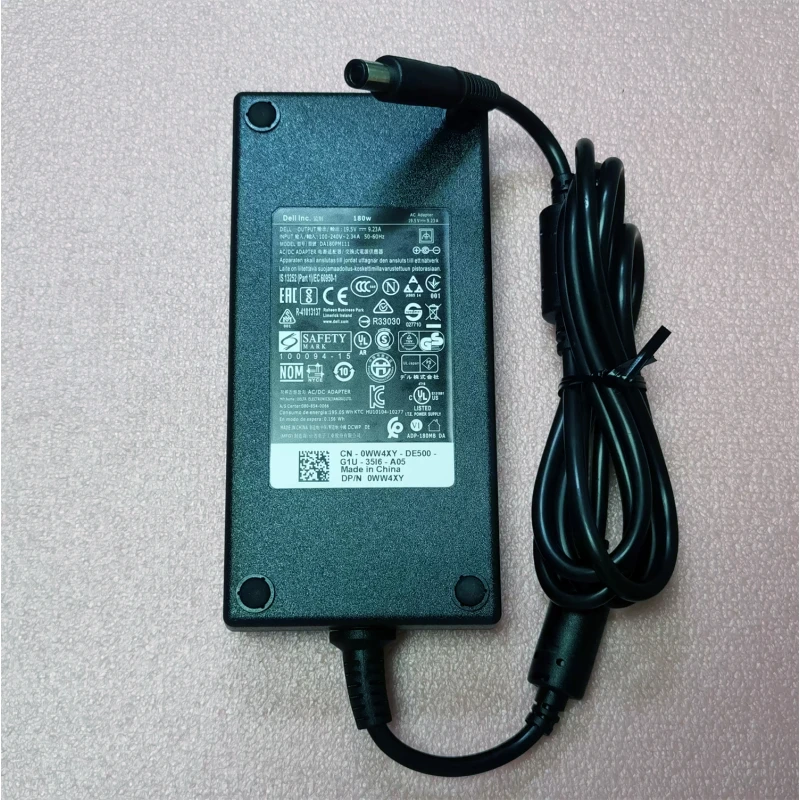
Dell G15 5515 5525 AC-Stromadapter 180W 7,4 mm x 5,0 mm – ein leistungsstarkes Netzteil für Laptops, das stabiles und effizientes Laden gewährleistet.
Technische Daten:
Kompatibilität: Garantiert passend für . Die Spannung muss immer übereinstimmen – eine abweichende Spannung kann Ihren Laptop beschädigen.
Nutzungshinweis: Stellen Sie das Netzteil auf eine feste, belüftete Oberfläche. Vermeiden Sie scharfes Knicken des DC-Kabels.
Garantie & Support: Alle Produkte haben ein 7-tägiges Rückgaberecht und kostenlosen technischen Support. Bei Fragen zur Kompatibilität kontaktieren Sie unser Team unter info@pcspare.com.
SKU: LT-10029048 | Zuletzt aktualisiert: 2026-10-21 07:27:08
Leistung: 180W | Spannung/Strom: 19.5V 9.23A | Anschluss: 7.4mm x 5.0mm
Diese Werte müssen mit Ihrem Original-Netzteil übereinstimmen, um eine sichere und stabile Stromversorgung zu gewährleisten. Ein Netzteil mit falscher Spannung oder Stromstärke kann Ihr Gerät beschädigen oder zu Fehlfunktionen führen.
Dieses Netzteil ist für Laptops konzipiert, die 180W benötigen und einen 7.4mm x 5.0mm-Anschluss verwenden. Es ist mit den in der Produktbeschreibung genannten Modellen kompatibel. Bitte vergleichen Sie die Teilenummer (G15 5515, G15 5525) mit Ihrem Original-Netzteil – stimmen sie überein oder sind sie als kompatibel aufgeführt, funktioniert es.
Wichtig: Auch wenn der Stecker passt, muss die Spannung exakt übereinstimmen (z. B. 19 V gegenüber 20 V). Eine abweichende Spannung kann das Mainboard dauerhaft beschädigen.
Dieses Netzteil verwendet einen 7.4mm x 5.0mm-Anschluss. Gängige Typen sind:
Prüfen Sie immer die Polung Ihres Original-Netzteils, bevor Sie es anschließen. Bei vertauschter Polung startet der Laptop nicht, und die Schutzschaltung kann auslösen (im schlimmsten Fall wird die Systemplatine beschädigt).
Wenn nichts davon hilft, ist das Netzteil möglicherweise inkompatibel oder defekt – kontaktieren Sie unseren Support.
Verwenden Sie immer das Original-Netzteil oder einen zertifizierten Ersatz. Ein unterdimensioniertes Netzteil (zu geringe Leistung) kann dazu führen, dass der Laptop die Leistung drosselt oder unter Last nicht lädt. Überdimensionierte Netzteile (höhere Leistung) sind in der Regel unbedenklich, da der Laptop nur den benötigten Strom aufnimmt – die Spannung muss jedoch weiterhin exakt übereinstimmen.